





Showing posts with label Software. Show all posts

Who does not like free stuff? Everyone likes free. Whether it's eating, watching, or even software for a computer though.
Since there is Internet, free software can be easily obtained from the download and even hijack the paid software though.
But beware of fake software that contains Trojans!
Malware Full Fake Software
Symantec recently announced a Trojan Gatak threat on many fake software. This Trojan will spy on, and it is not impossible to steal your data.
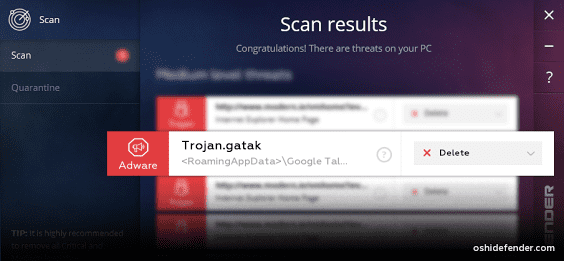
According to Symantec, Trojan Gatak infects by hiding on fake Keygen Software. So, it is not possible Keygen that you download is fake. Well loh, scary right?
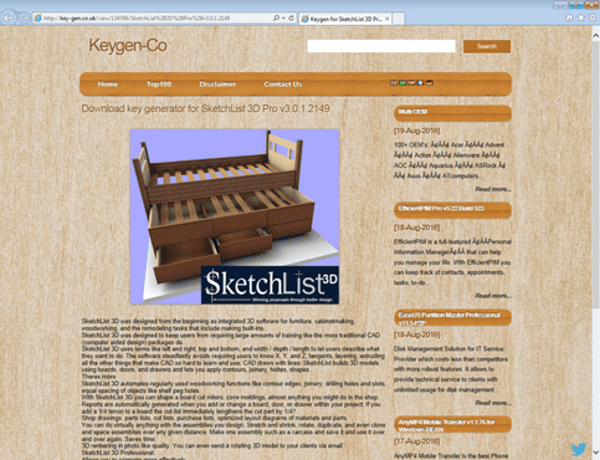
Quoted from Symantec's official page, if Keygen is falsely executed, it will come out unique characters such as Keygen Software Premium. However, in fact it is the process of downloading payload and activation of Trojan.
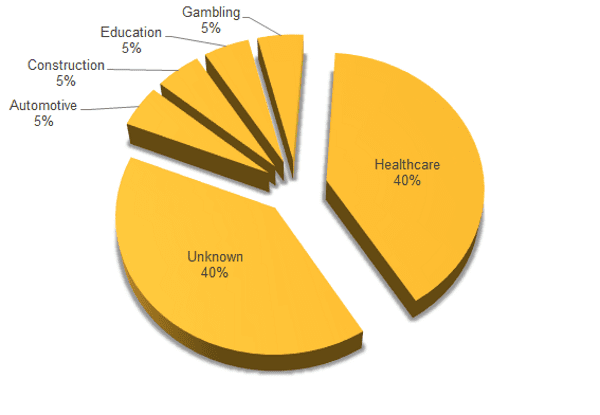
Currently most Trojan Gatak attacks the healthcare company. But, it is not impossible you will terjangkit Trojan Gatak if downloading the following fake software:
· SketchList3D
· Native Instrumnt Drumlab
· BobCAD-CAM
· BarTender Enterprise Automation
· HDClone
· Siemans SIMATIC STEP 7
· CadSoft Eagle Professional
· PremiumSoft Navicat Premium
· Originlab Originpro
· Manctl Skanect
· Symantec System Recovery
Alert! These fake Software Trojan Many Inserted
Do you have any idea to create your own game but confused what software used to make it? Looks like you should try the following software .
This time the Rat Way will give the best software recommendations that can be used to make a game easily. Some software maker of this game can also be used for free and without need heavy coding .
What free software can be used to make games easily? Here's the full review.
Free Software to Make Games
1. Construct 2
With No programming tagline needed! , Construct 2 is the best software to create games for you who never write coding during your life.
This game offers a pretty good GUI. To create a game, you just have to drag-and-drop . Game and variable logic can you customize easily.
Another advantage of Construct 2 is that you can publish your games to various versions, from HTML5, Windows Store, Chrome Web Store, or Facebook .
If you buy a paid version, you can also export to Android version, iOS, Windows, Mac, Linux, and many more.
Interested in making games with Construct 2? You can go directly to the following link : Construct 2
2.GameMaker: Studio
Almost similar to Construct 2, this software lets you create a game with just drag-and-drop . Even so, you can still change the script game with programming language that is easy to understand.
For the free version, you can publish the game to Windows version only . As for the paid version, you can export to Android, iOS, HTML5 , and many more.
Interested in making games with GameMaker: Studio? You can go directly to the following link : GameMaker: Studio
3. Unity
For game developers, of course already familiar with Unity software . This software allows you to create 3D-based games with ease. 2D games can be made.
For you who want to try to make a game with Unity, you can start with Personal version . In addition to free, some features Unity flagship can also use here.
Interested in making games with Unity? You can go directly to the following link : Unity
4. Godot Game Engine
Godot Game Engine is an open source game engine that supports 2D or 3D games. For 2D games, this software offers better performance, less bugs , and a cleaner workflow.
Godot uses a drag-and-drop system at the time of manufacture. However, users can expand it by adding a command script language Python commonly known GDScript .
Interested in making games with Godot Game Engine? You can go directly to the following link : Godot Game Engine
5. Unreal Engine 4
Of the many game engines that have been described above, it seems Unreal Engine 4 is a game-making software that is not intended for beginners.
For you who just tried Unreal Engine 4, no need to worry. There are thousands of Unreal Engine 4 tutorial videos you can see on YouTube if you feel confused.
In addition to making games, Unreal Engine can also be used to create virtual reality, education, architecture, and movies .
Interested in making games with Unreal Engine 4? You can go directly to the following link : Unreal Engine 4
The final word
That's some of the best software that can be used to create games. In addition to the above software , there are a variety of other game engines that can be tried, such as Stencyl , GDevelop and Defold . Good luck!
5 Best Free Software To Make Games Easily

Instead of watching TV, many people prefer accessing YouTube to watch their favorite shows. Especially when the internet access faster ; so watching a variety of music videos, vlog people, or even tutorial videos on YouTube is getting more comfortable.
But, did you know that YouTube is not just a medium for watching or sharing videos only? There is another YouTube secret function , but it is still rarely used by many people.
YouTube's Secret Function
Go to YouTube just to watch video? Ordinary. But if you can use YouTube for other functions, it's cool. Like creating a GIF image from a YouTube video .
The way to create animated GIF from YouTube is as follows:
- Go to the YouTube video link you want. Or search as usual on YouTube.

- · Next on the YouTube link listed in the address bar, please add the GIF word stuck with the word YouTube on the link. Then press Enter .

- · You will automatically be redirected to gifs.com page . There you can add various other elements to make your GIF animation from YouTube more interesting.

Now you know the secret YouTube function other than to watch the video. Have you ever tried it? If not, good luck yes!